

Blog
Before You Click: How to Spot a Phishing Email Before It Becomes a Cyber Incident
June 25, 2026
Before You Click: How to Spot a Phishing Email Before It Becomes a Cyber Incident
Cyber criminals don’t always need sophisticated hacking tools to access your business.
Often, all it takes is a convincing email.
According to Kordia’s New Zealand Business Cyber Security Report, around 43% of business cyber incidents involve email phishing. These emails are designed to trick people into clicking a link, downloading an attachment, or entering their Microsoft 365 login details.
At Focus, we’ve recently responded to an increase in phishing-related incidents affecting businesses across the South Island. One thing we’ve noticed is that these attacks aren’t targeting just one type of employee.
They’re targeting everyone.
Busy People Make the Best Targets
Business owners, directors, managers, finance teams, and frontline staff all receive dozens, if not hundreds, of emails every day.
Cyber criminals know this.
They create emails that look genuine, often pretending to be Microsoft, suppliers, couriers, banks, or even colleagues. Their goal is to create urgency, so someone acts before stopping to think.
We’ve seen incidents where company directors have entered their credentials into fake Microsoft login pages. We’ve also seen managers, finance teams, and general staff targeted with fake password expiry notices, invoice requests, and shared document invitations.
Cyber-attacks are no longer just an IT problem. They’re a business problem.
What Does a Phishing Email Look Like?
Modern phishing emails can be difficult to spot because they often imitate trusted organisations and brands.
Some of the most common examples include:
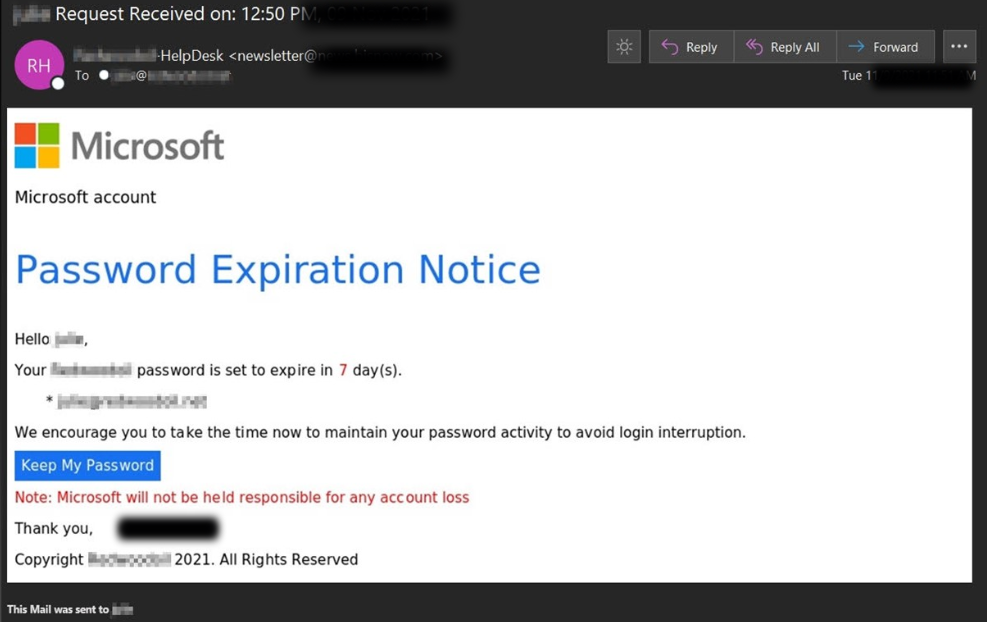
- Microsoft password expiry notifications
- Microsoft 365 sign-in requests
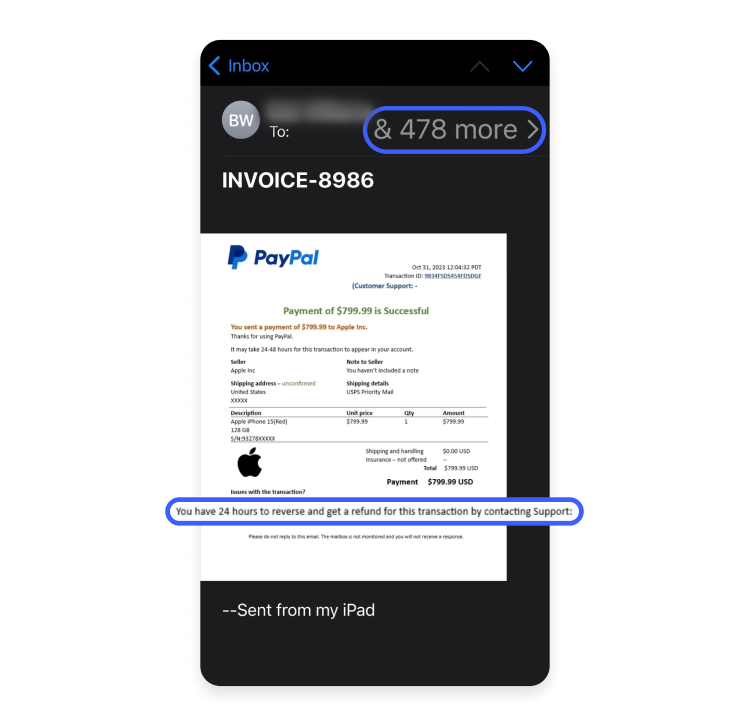
- Invoice and payment requests
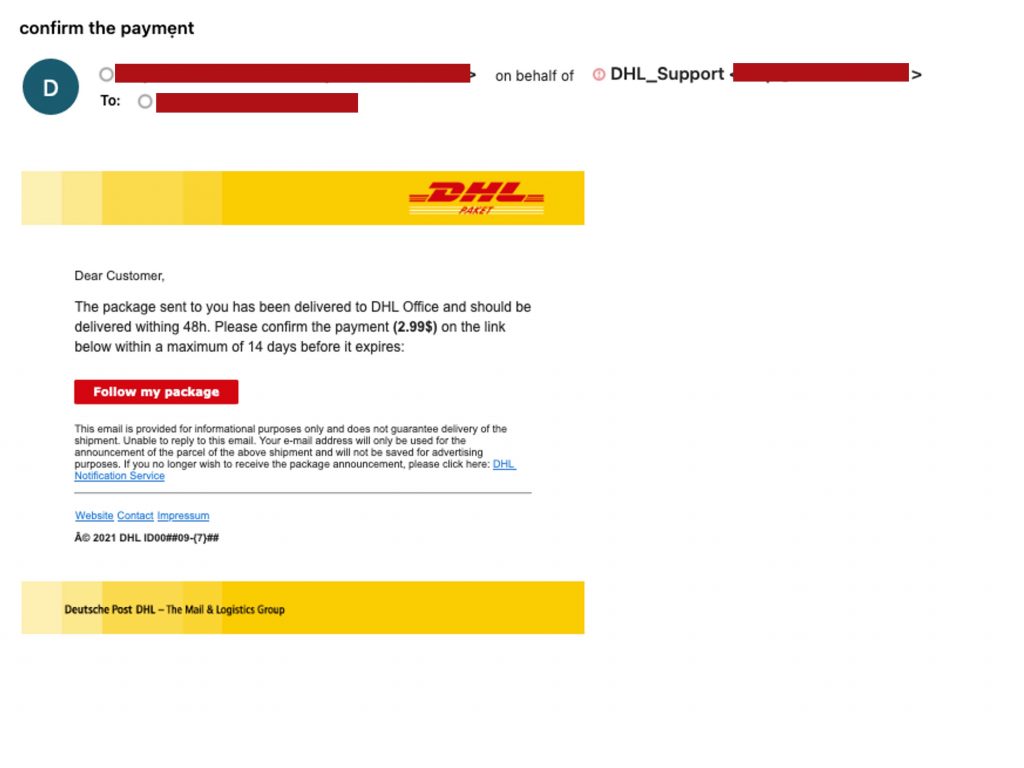
- Parcel delivery notifications
- Shared document invitations
- Banking verification emails
Many of these emails copy the branding, logos, and formatting of legitimate organisations, making them appear authentic at first glance. See samples below:
Before You Click, Pause
If an email asks you to log in, update your password, make a payment, or open an attachment, take a few seconds to ask yourself:
- Was I expecting this email?
- Does the sender’s email address look correct?
- Is the request unusually urgent?
- Can I verify this another way?
- Does the link go where I expect it to?
Those few seconds could prevent hours of disruption.
What Should You Do If You Think You’ve Clicked?
Don’t panic. Act quickly.
If you’ve clicked a suspicious link or entered your login details:
- Change your password immediately.
- Contact your IT support provider or internal IT team.
- Report the incident, even if you’re unsure whether anything has happened.
- Enable Multi-Factor Authentication (MFA) if it isn’t already enabled.
- Monitor your account for unusual activity.
The sooner an incident is reported, the greater the chance of containing it before further damage occurs.
Prevention Is Better Than Recovery
Good cyber security isn’t just about technology.
It combines secure systems, employee awareness, Multi-Factor Authentication, email protection, and ongoing monitoring.
Regular cyber security awareness training helps employees recognise suspicious emails before they become incidents. Just as importantly, creating a workplace culture where people feel comfortable reporting suspicious emails can significantly reduce the impact of an attack.
A few seconds of caution can prevent hours of disruption.
Protecting Businesses Across the South Island
Businesses across Christchurch, Timaru, Dunedin, Invercargill, Queenstown, Wanaka, and Gore are facing the same growing challenge. Phishing emails don’t discriminate by industry, business size, or location, and it only takes one successful click to disrupt an organisation.
At Focus, we provide managed IT services, responsive IT support, and cyber security solutions that help businesses stay protected before, during, and after an incident. Whether your organisation needs stronger email security, Microsoft 365 protection, Multi-Factor Authentication, user awareness training, or ongoing monitoring, our team is here to help.
If you’re looking for a trusted technology partner to strengthen your cyber security and support your business as it grows, we’d love to have a conversation.
Before you click, pause.
Source: Kordia, New Zealand Business Cyber Security Report. https://www.kordia.co.nz/hubfs/Kordia%20NZ%20Business%20Cyber%20Report%202025_2.pdf

